🚀 Supercharge your YouTube channel's growth with AI.
Try YTGrowAI FreeAtom IDE: Check Its Status for Python


Deciding whether to use Atom for Python means checking the editor’s support status and confirming that Python runs outside it. Atom is an open-source code editor, while a Python interpreter executes Python source code.
This article shows how to check Atom’s GitHub repository and run a Python file from a terminal.
TL;DR: Should You Use Atom IDE Today?
Atom can still edit files on an existing installation, but GitHub archived it, stopped its package service and ended security updates, so it is a poor choice for new or sensitive Python work.
- Keep an old copy only for offline work where you accept unsupported software.
- Run Python with a system interpreter or project environment. Syntax coloring inside Atom does not run the program.
- Choose a maintained editor when you need current packages, security fixes or dependable debugging.
What Is Atom IDE?
Atom is an open-source code editor created by GitHub. Atom IDE was a collection of optional packages that added language-oriented development tools to the editor.
An integrated development environment brings editing together with tools such as code completion, navigation, diagnostics or debugging. Atom’s core editor handled files, themes, panes and syntax highlighting.
I compared the original feature announcement with GitHub’s API response to keep historical IDE details apart from repository status. Atom was built on Electron, a framework for desktop software using web technologies.
I treat the result as repository status because my command queried GitHub’s API rather than launching Atom.
| Part | Its job | What to check |
|---|---|---|
| Atom editor | Opens, edits and saves project files | Does this installed copy launch and save a test file? |
| Atom IDE package | Adds features such as navigation or diagnostics | Is the required package already installed and working? |
| Python interpreter | Executes Python source code | Can Python run a file from the project directory? |
How to Check Atom Before Using It for Python
Check the official repository, run a sample Python file and compare the result with the tools your project needs.
Step 1: Check the Atom repository
I ran a Python script against GitHub’s public repository API. It reported atom/atom as archived and returned v1.60.0 as the latest GitHub release entry dated 2022-03-08.
Save this code as editor_status.py to read repository metadata and its latest release record without installing software. It uses only Python’s standard library, though its requests still need access to api.github.com.
import argparse
import json
import urllib.error
import urllib.request


def read_json(url):
    request = urllib.request.Request(
        url,
        headers={"Accept": "application/vnd.github+json", "User-Agent": "Atom-status-check"},
    )
    with urllib.request.urlopen(request, timeout=20) as response:
        return json.load(response)


def main():
    parser = argparse.ArgumentParser(description="Check an editor repository and its latest release.")
    parser.add_argument("--repo", default="atom/atom", help="GitHub owner/repository")
    args = parser.parse_args()
    base = f"https://api.github.com/repos/{args.repo}"
    try:
        repository = read_json(base)
        release = read_json(base + "/releases/latest")
    except urllib.error.HTTPError as error:
        print(f"GitHub returned HTTP {error.code} for {args.repo}. Check the repository owner and name.")
        return 1
    except (urllib.error.URLError, TimeoutError) as error:
        print(f"Could not reach GitHub: {error}")
        return 1

    print(f"Repository: {repository['full_name']}")
    print(f"Archived: {str(repository['archived']).lower()}")
    print(f"Latest GitHub release entry: {release['tag_name']}")
    print(f"Release date: {release['published_at'][:10]}")
    return 0


if __name__ == "__main__":
    raise SystemExit(main())
The first line stores a name in a variable. The second uses an f-string to place that value in the printed message.
From the folder containing the file, run the command below to print its repository name, archive flag and release record.
python3 editor_status.py --repo atom/atom
Repository: atom/atom
Archived: true
Latest GitHub release entry: v1.60.0
Release date: 2022-03-08

The endpoint returns a single repository release object and omits a complete inventory of binaries and platform-compatibility details. It reports a tag and date but does not tell you whether a local app starts on your operating system. Check the asset details and system requirements on GitHub’s official sunset page before using an old build.
Step 2: Run a Python file outside Atom
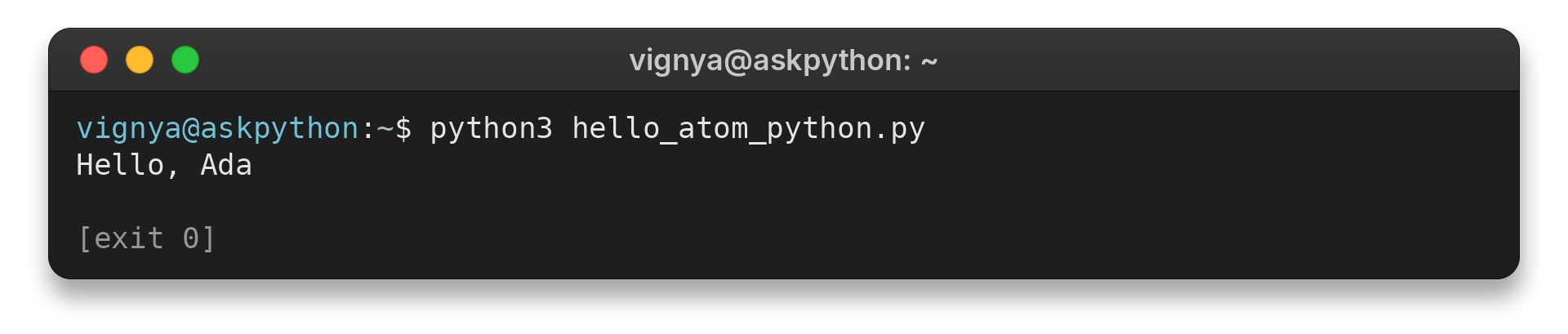
I ran the following sample file from a terminal to verify Python execution independently of Atom, and you can save it as hello_atom_python.py.
name = "Ada"
print(f"Hello, {name}")
python3 hello_atom_python.py
Hello, Ada
A Stack Overflow question asks, “the input() function is not working in the Atom editor by default.” Try an interactive program in a terminal before changing its Python source.
If your project uses a virtual environment, run the file with that environment’s Python interpreter. The editor’s run package and the terminal can select different interpreters, so compare their settings before treating a package error as a Python syntax problem.
The greeting is a basic execution check. The project’s own test suite should cover imports, input handling, environment variables and debugging within its documented Python environment.
Use the result to locate a problem before changing editors. If Python runs but an Atom feature is missing, inspect the relevant package or language integration. If Python cannot run the file, check the interpreter and project environment first.
When choosing a replacement, compare the feature you need rather than the editor name. The AskPython Python IDE roundup compares broader choices, and its VS Code for Python guide covers setup for that editor.
| What you see | Likely layer | Next check |
|---|---|---|
| Python colors appear, but navigation is missing | Editor language support | Check whether the needed package is already installed |
| A program waits at input() | Execution panel or runner | Try an interactive terminal that accepts keyboard input |
| A module imports in one place but not another | Interpreter or project environment | Compare which Python environment each tool uses |
Atom IDE Limits and Safer Next Steps
GitHub announced the December 15, 2022 sunset, and the repository page marks Atom archived on March 3, 2023.
I reproduced the repository-name error with the misspelling atom/atomm. GitHub returned HTTP 404 and the script advised checking the owner and repository name.
python3 editor_status.py --repo atom/atomm
GitHub returned HTTP 404 for atom/atomm. Check the repository owner and name.

Correct the owner or repository spelling and rerun the command. GitHub uses that owner/repository pair as part of the API address.
An Atom issue asked, “Will package downloads (from atom.io/packages) continue to work after the sunset?” GitHub’s sunset notice says package management stops after the sunset, so avoid designing a new setup around fresh Atom add-ons. Packages already installed locally may still work, depending on their own compatibility.
An editor runner launches a file or task from within the application. A language server provides information such as diagnostics and completion, and the editor must know where to find it.
GitHub’s sunset notice says Atom no longer receives security updates. That matters for projects containing credentials, private source or dependencies that need a supported editor. A successful launch confirms only that this installed copy opens on this system.
GitHub’s January 2023 notice tied a signing-certificate revocation to some Atom builds and named 1.63.1 or 1.63.0 as historical workaround downloads.
For “Is it still a good idea to use the Atom text editor?”, keep an existing copy only for brief offline tasks and choose a maintained editor for new work.
I compared the community fork’s public repository and latest release entry. Its API output listed v1.133.1, published 2026-11-01, for the unarchived Pulsar repository, a newer release record than Atom’s repository. Review compatibility and platform support separately before treating it as a migration choice.
python3 editor_status.py --repo pulsar-edit/pulsar
Repository: pulsar-edit/pulsar
Archived: false
Latest GitHub release entry: v1.133.1
Release date: 2026-11-01

Pulsar is maintained by a community outside GitHub’s Atom team. Its packaging and support decisions are separate. Test the packages your Python project needs in a copy before moving work there.
| Choice | When it fits | Trade-off |
|---|---|---|
| Existing Atom copy | Small, offline edits when required packages are already present | Features depend on tools already configured locally |
| Pulsar | You want an Atom-like interface | Community packaging and compatibility need checking |
| VS Code | You want a maintained general editor with Python extensions | Python features require selecting and configuring extensions |
| PyCharm | You want a Python-focused IDE with integrated project tools | The workflow differs from Atom and has a larger IDE interface |
Before switching, use this short project check:
- Copy the source files, tests and project data.
- Record the interpreter and dependency instructions separately from Atom’s editor settings.
- Open a copy in the new tool, select its interpreter and run the sample and project tests.
After the tests pass, carry over only the editor settings your project still needs.
Conclusion
For new Python work, choose a maintained editor with the interpreter and tools the project needs.
- For source-backed status, check the Atom repository and GitHub’s sunset notice.
- For an Atom-like community project, review the Pulsar release list before migrating.
- For Python editor choices, see AskPython’s IDE comparison and VS Code setup guide.
FAQ
These answers separate what Atom can still do from the support that ended.
Is Atom a good IDE for Python today?
Atom may edit and highlight Python files on an existing installation, but it is archived and no longer gets security updates or package management. Use a maintained editor for new or sensitive projects.
Can I still run Python code in Atom?
Atom can edit a Python file, while a Python interpreter runs it. Test Python from a terminal first because syntax highlighting alone does not execute code, and old Atom run packages may not be installable.
Can I still download Atom?
GitHub says pre-built Atom binaries remain downloadable from the archived repository releases. Availability does not mean the editor receives updates or that its package service still works.
What is the closest maintained alternative to Atom?
Pulsar is a community-maintained fork with a recent release record and an Atom lineage. Check current platform and package compatibility before migrating. VS Code and PyCharm are other maintained options for Python work.


