🚀 Supercharge your YouTube channel's growth with AI.
Try YTGrowAI FreeAdd Elements to Array Python


Adding values to a Python array starts with choosing how the new values should fit with the existing ones. A list can use append(value) to add one object at the end or extend(iterable) to add each item from an iterable.
In this piece, I’ll show how to add one or several values to a list.
TL;DR
Use list append() for one value, extend() for an iterable, and insert() for a position. For typed numbers, use array.array. NumPy append() returns a new ndarray.
- Use a list unless numeric type constraints or multidimensional operations call for another container.
- Remember that list and array.array methods mutate their object, while numpy.append() returns a copy.
What Is an Array in Python?
In Python tutorials, “array” may refer to a list, array.array, or a NumPy ndarray. Each has different methods and storage behavior.
A list can hold mixed Python objects. array.array stores values constrained by a typecode, such as signed integers. NumPy ndarray stores values in one or more dimensions with a consistent data type.
For ordinary application data, a list is usually the straightforward choice. Use array.array for compact typed values, or NumPy when numerical operations across dimensions matter. The array module guide and NumPy arrays guide give more background.
How to Add Elements to an Array in Python
Pick the operation by how many values you are adding and where they belong. The following run shows list edits, typed-array extension and a NumPy row addition.
Step 1: Add one or several values to a list
Call append(value) to add one object at the end. Call extend(iterable) to add each item from an iterable, and insert(index, value) to place a value before an index.
values = [2, 4]
values.append(6)
values.extend([8, 10])
values.insert(1, 3)
The run prints: list: [2, 3, 4, 6, 8, 10]. Passing [8, 10] to append() would add that whole list as one nested entry, not as two separate numbers.
Use len(values) to check the number of top-level entries. A list [2, 4] has length 2, and its length becomes 3 after append(6). A nested list still counts as one entry.
Slicing can add a sequence at a chosen position. The assignment values[1:1] = [3, 5] inserts both values before index 1. Assigning to a non-empty slice replaces that range, so use equal start and end indexes for insertion.
For example, with values = [2, 4], values[1:1] = [3, 5] produces [2, 3, 5, 4]. By contrast, values[1:2] = [3, 5] replaces the single item at index 1. Slicing assignment is useful when several values belong in the middle without building a separate concatenated list.
Step 2: Extend a typed array
Start by choosing an array.array typecode, then pass values compatible with it to append(), extend() or insert().
from array import array

numbers = array("i", [2, 4])
numbers.extend([6, 8])
print(numbers.tolist())
Here, extend() adds both integers to the existing values. A type mismatch raises an error, so check the typecode when values come from another source.
The standard array module is intended for compact sequences of basic numeric values, not arbitrary Python objects. Choose a typecode that represents the data you plan to store and keep appended values compatible with it.
Step 3: Add a NumPy value or row
NumPy append returns a new array, so assign its result. With no axis argument, the function flattens the input.
matrix = np.array([[1, 2], [3, 4]])
added = np.append(matrix, [[5, 6]], axis=0)
print(added.shape)
print(added.tolist())
The run reports shape (3, 2), followed by [[1, 2], [3, 4], [5, 6]].
Edge Cases When Adding Array Elements
Empty inputs, strings and multidimensional NumPy arrays expose common edge cases.
For an empty list, len(items) is 0. Calling append(value) changes its length to 1, while insert(0, value) places the new item at the beginning. With a longer list, an insertion index determines where existing values shift to make room.
Python lists have no fixed capacity to declare before adding items. If the input size is unknown, start with an empty list and append each value as it arrives. When the full input is already available as an iterable, extend() can consume it in one operation instead.
| Case | Symptom | Fix |
|---|---|---|
| Empty list | append() works, but an index can exceed the current length. | Start with items=[] and append, or use insert(0, value). |
| String passed to list.extend() | Each character is added separately. | Use append(“cat”) for one string or extend([“cat”]) for one iterable item. |
| Different array.array typecodes | Extending one typed array with another can raise TypeError. | Convert values to the destination type or construct both with matching typecodes. |
| NumPy dimensions do not match | axis=0 raises ValueError for a one-dimensional row. | Wrap the row in another list, such as [[5, 6]]. |
I passed a string to list.extend() and observed [‘c’, ‘a’, ‘t’]. It treats a string as an iterable of characters. Wrapping the string in a list makes it one added element.
I checked a 2-by-2 matrix with NumPy append and no axis. Its result had shape (6,). Passing [5, 6] with axis=0 raised ValueError because the row had one dimension and the matrix had two.
Wrap the row as [[5, 6]] and pass axis=0 to preserve the matrix’s two-dimensional shape.
In my run, the complete program printed:
list: [2, 3, 4, 6, 8, 10]
array: [2, 4, 6, 8]
numpy shape: (3, 2)
[[1, 2], [3, 4], [5, 6]]
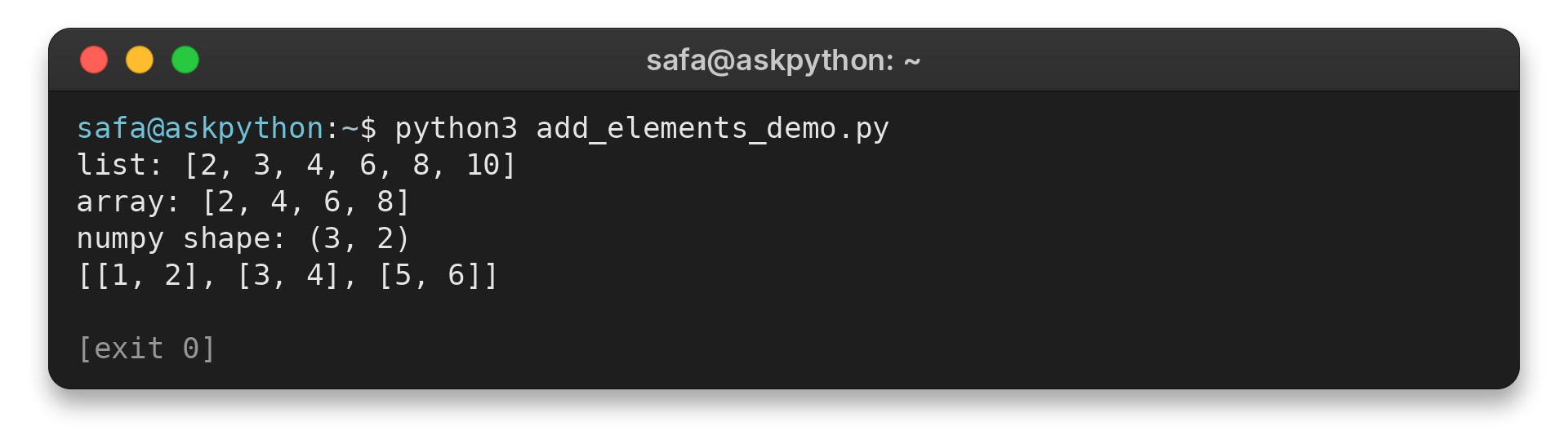
These results show why assignment matters for NumPy and why extend() differs from append(). Use the Python list guide for further list operations.
Conclusion
See the Python list documentation, array module documentation, and NumPy append documentation for full method details.
FAQ
These answers cover common choices when adding values.
How do I add all values from one list to another?
Call destination.extend(source) to add each item. Use destination.append(source) only when the whole source list should become one nested item.
Does NumPy append change the original array?
No. numpy.append() returns a new array, so assign the result to a variable to keep it.
How do I add an item to an empty list?
Create an empty list with items = [] and call items.append(value).